Table
Tables that split across pages and repeat their header rows.
Import them from @inkoxide/render. Examples, and how these components work together, are in the guide.
Table
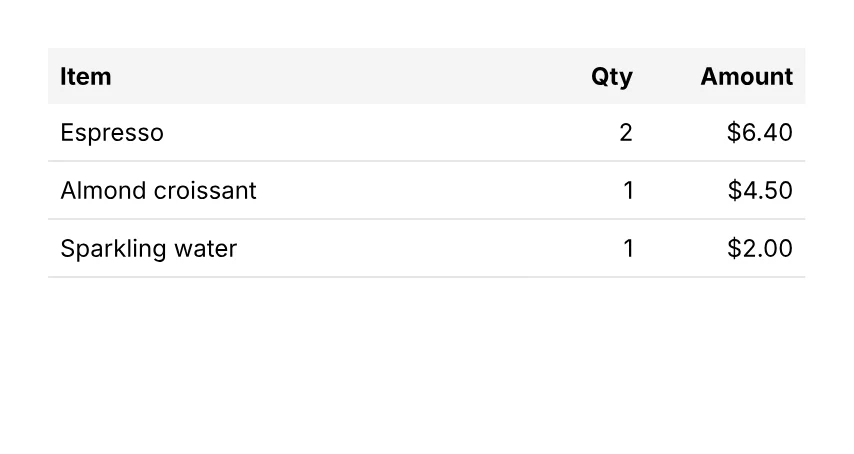
A table that splits across pages.
import { Cell, Document, Page, Row, Table } from '@inkoxide/render';

const items = [
  { name: 'Espresso', qty: 2, amount: '$6.40' },
  { name: 'Almond croissant', qty: 1, amount: '$4.50' },
  { name: 'Sparkling water', qty: 1, amount: '$2.00' },
];

export default function Example() {
  return (
    <Document>
      <Page size={[320, 170]} className="p-6 text-xs">
        <Table columns={['1fr', 40, 60]} headerRows={1}>
          <Row className="bg-stone-100 font-bold">
            <Cell className="p-1.5">Item</Cell>
            <Cell className="p-1.5 text-right">Qty</Cell>
            <Cell className="p-1.5 text-right">Amount</Cell>
          </Row>
          {items.map((it) => (
            <Row key={it.name}>
              <Cell className="border-b border-gray-200 p-1.5">{it.name}</Cell>
              <Cell className="border-b border-gray-200 p-1.5 text-right">{it.qty}</Cell>
              <Cell className="border-b border-gray-200 p-1.5 text-right">{it.amount}</Cell>
            </Row>
          ))}
        </Table>
      </Page>
    </Document>
  );
}
| Prop | Type | Description |
|---|---|---|
columns (required) | Array<number | string> | Column widths: points, '1fr'-style fractions, or 'auto'. |
headerRows | number | Rows repeated at the top of every page the table spans. |
It also takes the shared props break, wrap, minPresenceAhead, fixed, pages, href, bookmark, className, style, id, debug.
Row
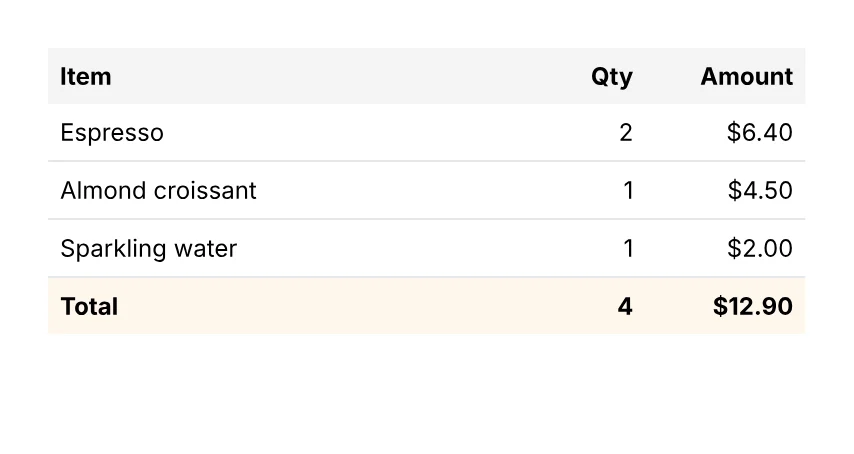
A table that splits across pages.
import { Cell, Document, Page, Row, Table } from '@inkoxide/render';

const items = [
  { name: 'Espresso', qty: 2, amount: '$6.40' },
  { name: 'Almond croissant', qty: 1, amount: '$4.50' },
  { name: 'Sparkling water', qty: 1, amount: '$2.00' },
];

export default function Example() {
  return (
    <Document>
      <Page size={[320, 170]} className="p-6 text-xs">
        <Table columns={['1fr', 40, 60]} headerRows={1}>
          <Row className="bg-stone-100 font-bold">
            <Cell className="p-1.5">Item</Cell>
            <Cell className="p-1.5 text-right">Qty</Cell>
            <Cell className="p-1.5 text-right">Amount</Cell>
          </Row>
          {items.map((it) => (
            <Row key={it.name}>
              <Cell className="border-b border-gray-200 p-1.5">{it.name}</Cell>
              <Cell className="border-b border-gray-200 p-1.5 text-right">{it.qty}</Cell>
              <Cell className="border-b border-gray-200 p-1.5 text-right">{it.amount}</Cell>
            </Row>
          ))}
          <Row className="bg-orange-50 font-bold">
            <Cell className="p-1.5">Total</Cell>
            <Cell className="p-1.5 text-right">4</Cell>
            <Cell className="p-1.5 text-right">$12.90</Cell>
          </Row>
        </Table>
      </Page>
    </Document>
  );
}
| Prop | Type | Description |
|---|---|---|
className | string | bg-*, min-h-* and text utilities (inherited by the cells). |
style | Style | |
id | string | |
minHeight | number | |
debug | boolean | Outlines the row's box. |
Cell
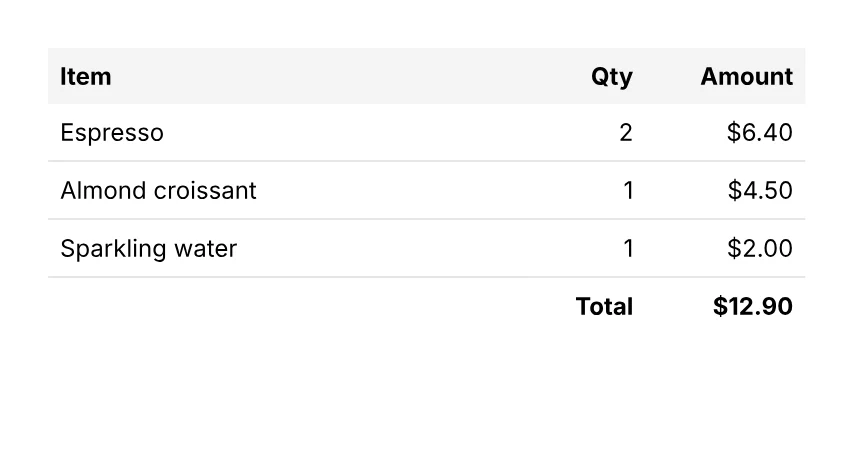
A table that splits across pages.
import { Cell, Document, Page, Row, Table } from '@inkoxide/render';

const items = [
  { name: 'Espresso', qty: 2, amount: '$6.40' },
  { name: 'Almond croissant', qty: 1, amount: '$4.50' },
  { name: 'Sparkling water', qty: 1, amount: '$2.00' },
];

export default function Example() {
  return (
    <Document>
      <Page size={[320, 170]} className="p-6 text-xs">
        <Table columns={['1fr', 40, 60]} headerRows={1}>
          <Row className="bg-stone-100 font-bold">
            <Cell className="p-1.5">Item</Cell>
            <Cell className="p-1.5 text-right">Qty</Cell>
            <Cell className="p-1.5 text-right">Amount</Cell>
          </Row>
          {items.map((it) => (
            <Row key={it.name}>
              <Cell className="border-b border-gray-200 p-1.5">{it.name}</Cell>
              <Cell className="border-b border-gray-200 p-1.5 text-right">{it.qty}</Cell>
              <Cell className="border-b border-gray-200 p-1.5 text-right">{it.amount}</Cell>
            </Row>
          ))}
          <Row className="font-bold">
            <Cell colSpan={2} className="p-1.5 text-right">
              Total
            </Cell>
            <Cell className="p-1.5 text-right">$12.90</Cell>
          </Row>
        </Table>
      </Page>
    </Document>
  );
}
| Prop | Type | Description |
|---|---|---|
colSpan | number | |
rowSpan | number | |
verticalAlign | 'top' | 'middle' | 'bottom' |
It also takes the shared props className, style, id, debug.
Synced from components/table.md in the inkoxide repository.